-
Flying vehicles don’t go up or respond sometimes, jumping out and back in might help.
-
Graphical glitch that has been in game for months. Only unvisible in some camera angles. (New Limnadian area, medium to very high settings)
-
Cant see item info or right click items in vehicle inventories.
-
Radar Zooms out automatically, dont know when it does it

Title: Shopkeeper items not displaying prices and view information not available
Date Found: [09/16/2026]
Description: The items displayed in the shopkeeper are not showing prices, right clicking brings up the dropdown menue but it does not work when clicked
Expected: The prices to be displayed so items can be sold
Actual: See above
Steps to reproduce: open shopkeeper, click on items and be disappointed.
edited additions to new message after hotfix announcement
New hotfix is out! Restart your game to apply it.
4 Likes
- Changing pages on action bar goes wrong way; down = bigger number
Edit. added picture what I meant. And these projections feels annoying and completely unnecesary.

1 Like
I would like to show ped balance in the dashboard without it overriding half the reload bar
1 Like
In a shop with retail partition high (c)
The top shelf items appear when in 3rd person but when you zoom into first person they disappear, but can still highlight them even though the image isn’t there.
When splitting a stack in inventory, the number keys (both regular & numpad) no longer affect the rollers in the split window. This is a real pain when trying to split out 99 items as instead of hitting the ‘9’ key 2 times I have to click 10 times on each of 2 rollers (20 clicks).
2 Likes

Since we are probably stuck with this, if you put a note behind the finder interface, it gets slightly better, but still hard for me to read the claim size for instance.
Chat’s new tab also works
1 Like
Also forgot to mention that “losing signal” and “scanning” animations, makes my eyes twitch literally 
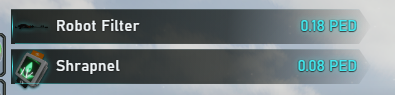
Pictures in loot are fcked up.
Edit. Those wrong item images are in my inventory
Title: Message Center Notes stuck on infinite loading and cannot be interacted with
Date Found: 09/16/2026
Description:
When opening the Notes section in the Message Center, the notes become stuck on loading. I can see what appears to be the note pages in the background, but I cannot access or interact with them.
Expected:
The Notes section should finish loading, and I should be able to access, read, edit, and interact with my notes normally.
Actual:
The Notes section remains stuck on loading. The pages appear to be present in the background, but they are inaccessible and unresponsive.
Steps to reproduce:
- Log in to Entropia Universe.
- Open the Message Center.
- Navigate to the Notes section.
- Wait for the Notes to load.
- Observe that the Notes remain stuck on loading and cannot be accessed or interacted with.
Screenshots:

2 Likes
- Cant type the sum to extract from PED Card. Neither can click numbers down to fast get to number 9. Card also has condition bar.
- No item info option in trade window.

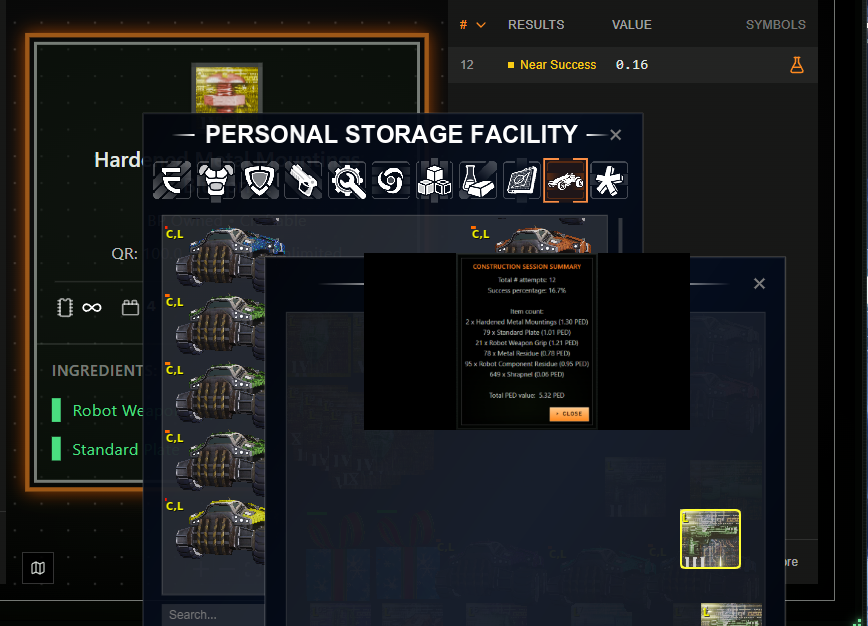
Title: Crafting session summary window sometimes appears too small and cannot be clicked
Date Found: 09/16/2026
Description:
When a crafting session finishes, the session summary window sometimes appears at an unusually small size. In this state, the window cannot be clicked or interacted with. I have to click around in random places on the screen, or simply wait for the notification to expand to its normal size, before I can interact with it.
Expected:
The crafting session summary window should appear at its normal size and be immediately clickable and interactive as soon as the crafting session ends.
Actual:
The session summary window appears too small and cannot be clicked or interacted with. It remains unresponsive until it randomly expands to a normal size after some time or after clicking around the screen.
Steps to reproduce:
- Start a crafting session.
- Complete the crafting session so the summary window appears.
- Observe that the summary window sometimes appears at a very small size.
- Attempt to click or interact with the window.
- Notice that it cannot be clicked and remains unresponsive.
- Click around in random places or wait for a while until the window expands to its normal size and becomes interactive.
Screenshots:
2 Likes
Title: Warp Ship Guest List freezes when interacting with right-hand side and often fails to load on first open
Date Found: 09/16/2026
Description:
When using the guest list on a warp ship, interacting with the right-hand side of the guest list causes the entire guest list to become buggy and freeze up. Additionally, the first time I open the guest list it usually does not load. I have to close the first one and open a new one, and the second one usually loads correctly.
Expected:
The warp ship guest list should load correctly the first time it is opened. Interacting with any part of the guest list, including the right-hand side, should work normally without freezing or causing the interface to become buggy.
Actual:
The first guest list window usually fails to load. After closing it and opening a new one, the second window usually loads. However, if I interact with the right-hand side of the guest list, the entire guest list becomes buggy and freezes up.
Steps to reproduce:
- Board or access a warp ship.
- Open the guest list.
- Observe that the first guest list window usually does not load.
- Close the first guest list window.
- Open the guest list again.
- Observe that the second window usually loads correctly.
- Interact with the right-hand side of the guest list.
- Observe that the entire guest list becomes buggy and freezes up.
1 Like
Title: Avatar Nameplate alignment issue, expired Event Trophy still displaying, and overly flashy HP bar
Date Found: 09/16/2026
Description:
There are several visual issues with the avatar nameplate UI:
- Name Alignment: The alignment of the name text on avatar nameplates appears to be off (it is centered on mine).
- Persistent Event Trophy: The trophy icon above my head from the past event is still displaying. The event has ended, and the trophy gets in the way and is becoming annoying. I would respectfully like it removed.
- HP Bar Style: The HP bar is visually too flashy and distracting. It would be better if it were more subtle.
Expected:
- Name Alignment: The avatar nameplate text should be aligned correctly.
- Persistent Event Trophy: Trophies from expired events should be automatically removed, hidden, or have an option to be toggled off, as they obstruct the view.
- HP Bar Style: The HP bar should be more subtle and less visually distracting.
Actual:
- Name Alignment: The nameplate alignment is off (centered).
- Persistent Event Trophy: The expired event trophy remains above the avatar’s head, obstructing the view.
- HP Bar Style: The HP bar remains overly bright and flashy.
Steps to reproduce:
- Log in to Entropia Universe.
- Look at an avatar’s nameplate (e.g., my own).
- Observe the alignment of the name text.
- Observe the persistent trophy icon above the avatar’s head from the past event.
- Observe the color and style of the HP bar.
Screenshots:


2 Likes
expected: to see progress on a mission with a bar that fills up
actual: there no longer is a progress bar, so there’s no knowing how long the mission will take
1 Like
Everytime I alt-tab the game the camera is off, i gotta to into 1st person view and then back to 3rd person to stabilize it.
The radar also resets the ± settings when teleporting. The game slows down terribly on low settings.

