The RSS-feed at https://account.entropiauniverse.com/rss-vu-news.xml sent out https://account.entropiauniverse.com/news/pages/2026/09/08/6942/index.xml for the 19.10.0 release notes, but that URL returns “No post found”.
Can we also get a LIGHT mode?


NOTE: These are 1-2 minutes of ChatGPT, and are not what I would use as a final design (Not gonna waste time, to create a really great interface as its not my job). Just a rough sketch, yet it gives imho some great ideas that would be usable.
2 Likes
What, you don’t want the black and green screaming into your eyeballs?
1 Like
The 2d map itself is a joke and can’t zoom out all the way so it’s impossible to locate waypoints.
When putting something on the trade terminal it should disappear from inventory and it does not! Not convenient at all when you want to recycle a bunch of stuff. Same with trade windows in pvp or missions. If you move the item to the window it should disappear from your inventory!
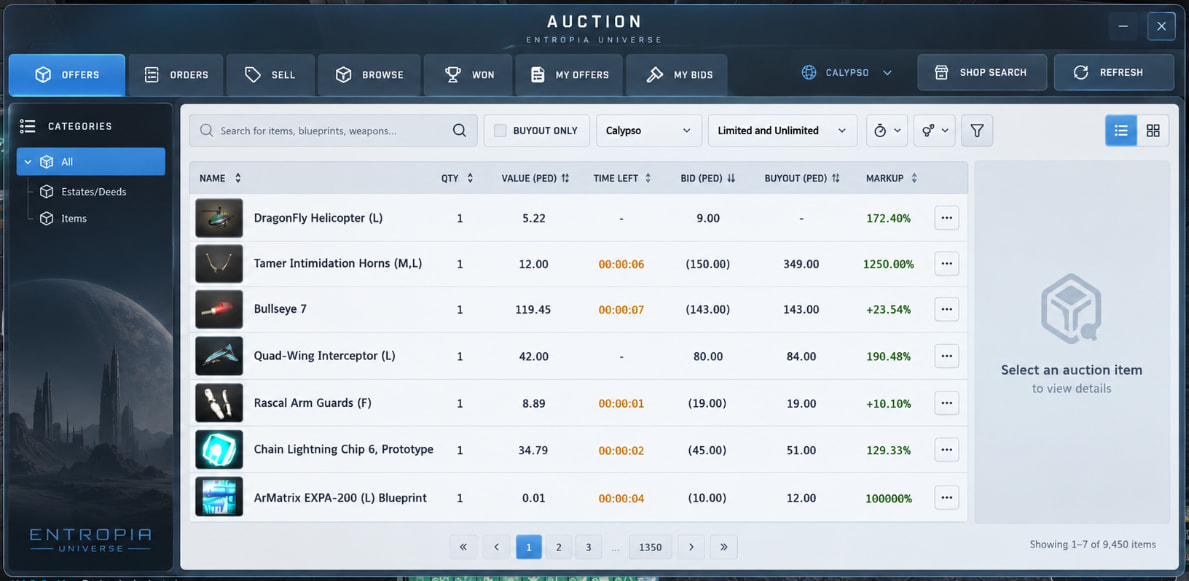
The auction misses de most usable option, organize by buyout % !!! Like, do you even play the game?
Auction now needs more clicks to be able to make sell with BO. And the arrows don’t organize anything. And also it’s huge windows on a 1080p resolution.
The chat highlight option don’t work. All the hidden tabs keep blinking even after I selected the option to not blink.
The new crosshairs are HUGE! I saw a guy streaming space mining and the crosshair is bigger than the asteroid itself.
The mining interface window it too big. And when pressing escape it disappears. Let us resize everything, like the mining interface and the Progress windows! Before the people playing in 4k complained, now all the ones that still playing in 1080p complain because everything is huge on the screen!
The game looks more fluid but the GPU is working harder than before even without change any graphics options. It’s like 10ºc higher than before.
5 Likes
After playing a bit more…
Graphic options get a reset every time I relog. In my case they always go to Very High after I relog.
When leaving the game, pressing Esc and exit makes the Progress window to disappear. But it get back after relog.
GPU temperatures still too high compared with before this VU. Even changing settings back to low after relog, the GPU temp is around 67ºc, before this VU playing on medium settings it was around 55ºc max.
The craft window minimum size is almost the whole screen. If it was huge before not even allowing you to see your avatar now it humongous. And then you have a button to make it full screen. This makes no sense at all.
Craft window, Auction window and mining interface window need to get smaller. At moment the finder interface window is 1/4 of the screen. The craft window is 75% of screen. And Auction window is 85%.
The ideal windows sizes on my view: Miner interface should only be half of what it’s now. Auction window less 25% of the actual size. Crafting window maximum of 1/4 of the screen and then full screen if you chose to. The Progress window need to be able to be resized too.
I play at 1080p on a 27’ inch screen. You optimizing the game like everyone is playing on 4k resolution on a TV screen.
1 Like
Also many cloth items are getting light problems. My Nusul backpack is completely dark while someone’s hat is super bright! I did not yet made the new avatar, just running around with the auto converted one. It looks like the light is getting through my body while on the back everything is dark.
@Ludvig_MindArk , one suggestion with the updated mining finder interface. Would it be feasible to add current position for the avatar for latitude and longitude in the finder UI itself, possibly in the area I highlighted below? I know others as asking to reduce the size of it, but it looks like there still could be plenty of room for this addition.

Part of the reason for this is helping out Little Big Mining Log as it works best when there is an opaque background unlike the current transparent HUD coordinate display. The change to mining deeds already looks like it should be an improvement in that regard, so that change already looks helpful.
In general though, us miners rely on specific coordinates much more than hunters, so it would make sense for the tool itself to display coordinates regardless of any 3rd-party tools. In theory it could replace the need for coordinates being displayed in the HUD.
Edit: Another addition could be listing what amplifier is attached as well (instead of having to check in the inventory itself).
3 Likes
Could you implement a legacy option to use old old graphics / interface? The new intreface looks horrible (before it was simple to understand and fast to use), auc is painfuly slow compared to before, no way to sort by buyout, double clicking an item dosnt open buying options (have to manualy click to buy with mouse) and other multiple annoyances…
The game was made worse for no good reason seemingly, instead of UR5 graphics we get an ui update no one asked for…
1 Like
Hotfix Notes: Entropia Universe 19.10.0 Hotfix Notes
Dedicated Bug Report Thread: Sept 2026 Release: Bug Report Thread
1 Like
Congrats MA!
Taking something super ugly and making it way worse requires a lot of… I don’t even know…
VU was postponed a week to make it as smooth and polished as possible, I’m curious in what state was it before this last week of polishing
4 Likes
It looks like we now have mining in the codex but my claims are not registering (I’m on Arkadia) is it yet to be activated or something?
1 Like
Hello ! about auction, when you sold something, ore for example, you dont see the number of pieces sold, you can see just the value and this is extremly important. Thank you .p.s. auction now is so bad and so… a super frustrating thing to do that is pure and simple unbelievable. I actualy cant believe that someone can do something like this, from a very good auction to a maximum posible worst thing imaginable. I see it infront of me, but i still cant believe it, no ofence intended, is just reality/