[SIZE=4]Bug Report[/SIZE]
[SIZE=4][/SIZE]
[ul]
[li][SIZE=4]Title: It lags when you try to repair a mothership/uneven pace[/SIZE][/li][li][SIZE=4]Date Found: 03/01/2024[/SIZE][/li][/ul]
[SIZE=4]
Description:
[/SIZE]
[ul]
[li][SIZE=4]Expected: I hold e for 2 secs to initiate auto-use, expect that you should have an even pace when you repair a section on the mothership[/SIZE][/li][li][SIZE=4]Actual: You’ll experience that you repair some, it lags, you repair some again, it lags, it’s not a steady pace.[/SIZE][/li][/ul]
[SIZE=4]Steps to Reproduce:
[/SIZE]
[ol]
[li][SIZE=4]Enter a mothership that needs repairing, and walk to the nearest station[/SIZE][/li][li][SIZE=4]Equip a repair tool, and hold e for 2 secs in order to initiate auto-use.[/SIZE][/li][li][SIZE=4]See that it stutters and repairs, and not at a steady pace[/SIZE][/li][/ol]
[B]Bug Report
Title: Pub Dubliner Monria DSEQ9
Date Found: 03.03.2024
Expected:I expected to drink beer, scream the drunken sailor song at the top of my lungs, and dance riverdance with red-haired beauties.
Actual:I’m stuck to a chair in a pub and can’t move except to tap my feet to the song.
Only restarting the game helps.
https://www.youtube.com/watch?v=mFW4N4C05gI
PS Question closed, I needed to press the F key.[/B]
Probably for privacy in sharing screenshots at a guess
A request from the previous round and great that they picked it up. It didn’t matter before streaming was a thing but now not everybody wants to show off their money.
You can turn it back on in options.
He meant why hide by default ? I agree with him too . If you streaming you have a option to turn off but why disable it for everyone by default.
why not? if you want it, activate it.
I just registered today and I don’t know if it’s possible to see my balance in hud ,what should I do?
live without it? we’ve lived without it for the longest time before that update 
turn on in options person who just registered today in 2016
It is only one keystroke to seeing your balance: “i”
The original suggestion would have made it an option to either show or hide it in both places at the same time, otherwise opening inventory on stream defeats the purpose again.
So the option was implemented for streamers - makes sense. Reinforces the point of NOT hiding it by default, streamer population has to be smaller than non streamers I recon even if they are more connected.
Bug Report
[ul]
[li]Title: Images of things do not appear[/li][li]Date Found: 03/03/2024[/li][/ul]
Description:
[ul]
[li]Expected: In the previous version there was an option to make images of things disappear or appear in view information[/li][li]Actual: Now, if you had the option activated in the previous version, now you cannot deactivate it to see the images in the view information[/li][/ul]
Screenshots:
[B]Screenshot of view information[/B]
Steps to Reproduce:
[ol]
[li]Right click on the item[/li][li]Click on view information[/li][li]If it was disabled before, now there is no option to reactivate the images.[/li][/ol]
Bug Report
[ul]
[li]Harvesting tool (PH-3) doesn’t work with “auto use key” (F) or right mouse button.[/li][/ul]
Description:
[ul]
[li]Expected: one could use the F-key or right mouse button to auto use the harvesting tool.[/li][li]Actual: Now you have to click the tool every time to get it to make another attempt.[/li][/ul]
Steps to Reproduce:
[ol]
[li]Go stand next to a harvest-able tree.[/li][li]Start the harvester tool by pressing the F-key or right mouse button.[/li][li]After 1 attempt the tool stops. [/li][/ol]
Bug Report
[ul]
[li]Title: Timer box for Cyrene Imperium Snow Base is not large enough and doesn’t render right[/li][li]Date Found: 03/04/2024[/li][/ul]
Description:
[ul]
[li]Expected: When in the Imperium Snow Base the timer box should display the time remaining for the instance.[/li][li]Actual: The text is larger than the textbox. Some text is not displayed. What looks like a possible scroll bar is not rendered correctly and does not work. The time remaining is displayed below the textbox background and hard to read. I will recreate the box below:[/li]
you have to leave and return (system limit) _____________________________________ 05:03:56 [/ul] Steps to Reproduce: [ol] [li]Enter Imperium Snow Base Instance 0, 1/2, 1[/li][li]Look for the timer box after entering the instance[/li][/ol]
[This is a repost of: https://www.planetcalypsoforum.com/forum/index.php?threads/ui-release-bug-crash-report-thread.298588/page-10#post-3932930 which can no longer be edited]
Have added a screenshot though of what you used to be able to do screenshot wise, but now CANNOT. 10PED to the first one who can reproduce the screenshot today with out using a friend or (cough) 2nd account.
Bug Report
[ul]
[li]Title: Avatar head doesn’t retain last position when using rotation camera or photo mode[/li][li]Date Found: After Control UI update ages ago[/li][/ul]
Description:
[ul]
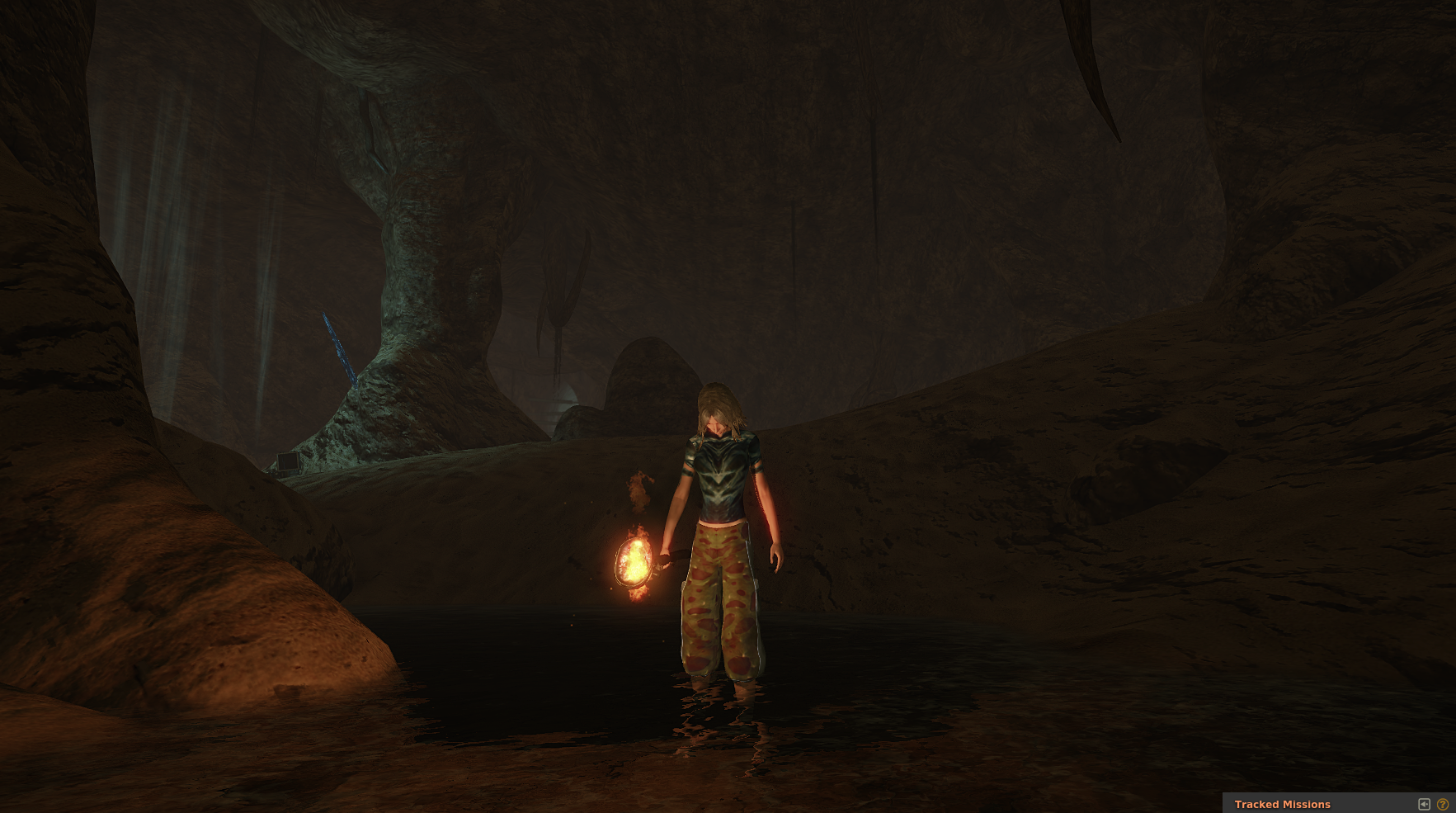
[li]Expected: For example, when turning avatar’s head down and a bit to the right and then rotating the camera to view the avatar from the front, the avatars head will stay pointing in the direction it was pointing before use of the rotation camera.[/li][li]Actual: As soon as the rotation or pose camera is used, avatar’s head snaps back to looking ahead and dead straight. Makes it impossible to take the kind of screen shots or views we used to be able to prior to control UI update as avatar can never be viewed from the front looking down, or to the right a bit or, similar.[/li][/ul]
Steps to Reproduce:
[ol]
[li]Go to third person mode[/li][li]move/position avatar for example looking at something up and to the right[/li][li]use the rotation cam to view the avatar from the front, observe avatar is no longer looking up and to the right but instead has moved head to looking straight ahead and level[/li][/ol]
Screenshot: “Something just touched my leg!” - impossible to reproduce this today 
http://fluffy.spacetechnology.net:5000/pe/bug/cantlookdown.png
Bug Report
[ul]
[li]Title: Deposit icon is still yellow[/li][li]Date Found: day one of update[/li][/ul]
Description:
[ul]
[li]Expected: We were told one of the main reasons for the new UI was uniformity[/li][li]Actual: All icons are white, except for the deposit icon which is a stupid yellowish tint[/li]
[/ul]
Steps to Reproduce:
[ol]
[li]Enter the Universe[/li][li]Look for the only icon that is of a different color[/li][/ol]
simple fix, just do it
please
This belongs in UI Feedback
i consider it a bug not a feature
Bug Report
[ul]
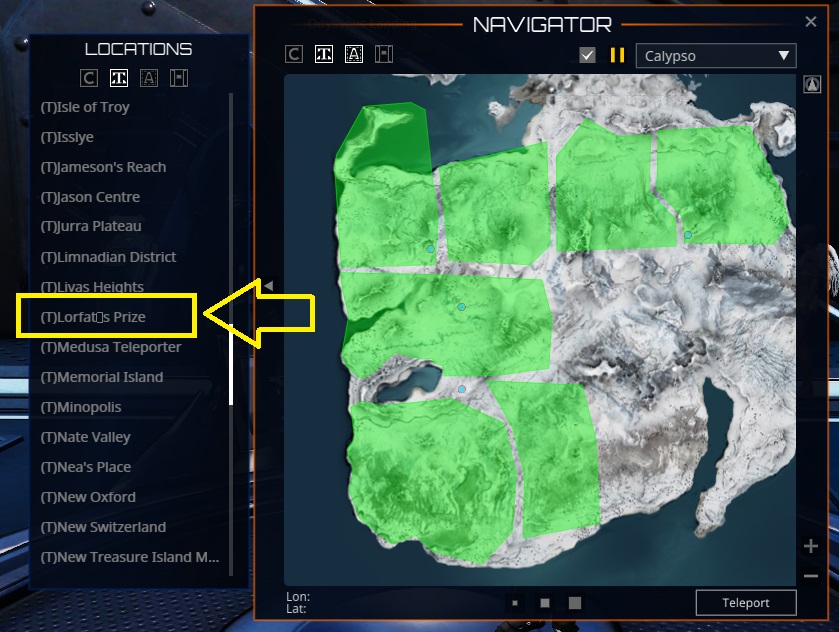
[li]Title: On Map/Teleport dialog, Lorfat’s Prize shows ’ character as a box (might be wrong character)[/li][li]Date Found: 4/3/2024[/li][/ul]
Description:
[ul]
[li]Expected: All TP names to render correctly[/li][li]Actual: The font doesn’t seem to support whatever character is used for a ’ in this TP name and draws a square instead[/li][/ul]
Steps to Reproduce:
[ol]
[li]Open map or TP dialog[/li][li]scroll to Lorfat’s Prize[/li][li]Observe name render weirdness[/li][/ol]
Screenshot: http://fluffy.spacetechnology.net:5000/pe/bug/lorfat_render_error.jpg